
Mississippi County Case Search Choices
For a Mississippi County state-court case search, the public starting point is Missouri Case.net. Pick the search mode that matches what you know. An exact case number is usually best. A name search works when the number is unknown. If the case opened in a known stretch of time, try a filing-date search. For a future setting, use the Scheduled Hearings & Trials mode. Federal cases do not belong in this portal at all.
Mississippi County sits in the Circuit Court of Missouri, 33rd Judicial Circuit, alongside Scott County. Use the court selector where offered. Check the displayed county before you rely on a hit. A city ordinance case may also call for the municipal clerk's local instructions.
The official Case.net source lays out the public case-search entry point. It also lists every search mode offered.
Case.net covers Mississippi County public state cases. A blocked, secure, or incomplete result calls for a lawful fallback through the clerk.
Searching Cases by Name
Type the last name or organization name first. That is the rule for a Mississippi County case search by name. Add a first name, case type, filing year, or a 33rd Judicial Circuit limit. Do so only when it trims the list. Common surnames can pull records from many counties, divisions, and case categories at once. Before treating an entry as the right case, match the style, the location, the filing date, the party role, and the case type.
- Open Case.net and choose the litigant-name search.
- Enter a last name or organization name, then add a first name only if it improves precision.
- Limit the search to Mississippi County or the 33rd Judicial Circuit when the selector permits it, and use a case type or filing year for a common name.
- Compare the case number, location, style, filing date, and party role in the result list.
- Open the result only after those fields fit, then read the case header and Docket Entries in order.
Case.net's public material hides day and month of birth, Social Security numbers, and confidential addresses. Never try to fill those gaps elsewhere or copy personal details from a result.
Mississippi County Case Search Fields
The live Case.net labels and required markers are best confirmed in the portal itself. Official Missouri materials document the search elements that follow. They help you plan a Mississippi County case search without guessing at fields.
| Search mode | Documented field or option | Use in a Mississippi County search |
|---|---|---|
| Litigant name | Person or organization, last or business name, first name, case type, and possible filing-year narrowing | Use names with the circuit or county limit for a more focused result list. |
| Case number | Participating-court selector and complete case-number text field | Use the exact displayed number, including every letter, hyphen, and suffix. |
| Filing date | Court selector and beginning and ending dates | Start with a narrow period, then widen only if needed. |
| Scheduled hearings | Date or date window and documented judge, commissioner, or attorney choices | Use when the Mississippi County question is about a future court setting. |
Note: A result list is an index of public case information. It is not a certified record and no substitute for the clerk-held file.
Mississippi County Case Search Log
Keep enough notes to repeat a Mississippi County case search later. Skip needless personal details. Jot the search date and time, the Case.net mode, the court selector, your non-private search terms, the result count, the case number and type, the filing date, the current status, the judge or division where shown, and the last visible docket entry. A short log has a real payoff. It lets you tell an observed public result apart from a later change in the case.
Chasing a hearing? Note the date window you used and the setting shown. Chasing a document? Record whether a link appeared, whether it opened, and whether courthouse-terminal access came up. That way you return to the correct Mississippi County record rather than a stale copied result.
Searching by Case Number
An exact, complete number is the safest key for a Mississippi County case search. Enter it exactly as written. Use the form shown on a court notice, docket, or clerk-provided record. Missouri Court Operating Rule 4 covers uniform numbering concepts. Categories include CR, CV, JU, and MU. Do not build a local number from a guessed county code.
From the number, open the case summary. Then open the Docket Entries tab. Verify the court, county or location, case type, and filing date. An older paper file may carry a legacy number. Ask the Circuit Clerk how it maps to the automated record. A complete court file can hold material the public online result never shows.
Use the exact Case.net number displayed by the court
Mississippi County Case Search Precision
A Mississippi County case search can hand you a plausible but wrong result. The risk rises with common names. It also rises when the search spans more than one county. Read the header before the entries. Check the court or circuit. Check the county or location. Then check the case type, filing date, case status, judge or division where shown, and the party role. A surname match alone is not enough. It never proves the file belongs to the person or event you are chasing.
Then read the docket in date order. "Filed," "entered," "set," "continued," "disposed," "dismissed," "judgment," and "closed" each describe different actions. The last visible entry and any future setting matter more than one isolated earlier line. Keep notes on the search date, mode, court selector, case number, and public result fields. Leave sensitive personal information out of them.
What a Case Search Returns
A Mississippi County case search can return plenty of useful detail. Expect the case number, style, type, and location. The filing date, party roles, and judge come with it. Status, docket entries, hearing settings, and document links may appear when access is allowed. Treat those links with care, though. A link shows a document exists. It does not prove the document is complete, certified, or public in every form. Read the whole visible chronology. Keep the current status separate from the date a document was filed.
| Case header | Identifies the available case number, style, type, location, filing date, status, and associated court information. |
|---|---|
| Party roles | Shows the procedural role in the case where public display permits it; compare roles rather than relying on a name alone. |
| Docket Entries | Chronological filing, setting, order, service, payment, disposition, or other event entries. |
| Hearing information | Future or listed settings where the public record makes them available. A setting can later change. |
| Document links | Available public documents when security level and remote access allow them. They are not necessarily certified copies. |
Mississippi County Case Search Result Review
Think of a Mississippi County Case.net result as an access layer. It is not the final official record. The Missouri File Viewer help lays out the document actions eligible users get. Those actions include Preview, Download, Clear, and Print. It also notes that case numbers can link back to Docket Entries. Some public records still lack an online document. The reason may be age. It may be security markings, confidentiality, a seal, or availability only at a courthouse terminal.
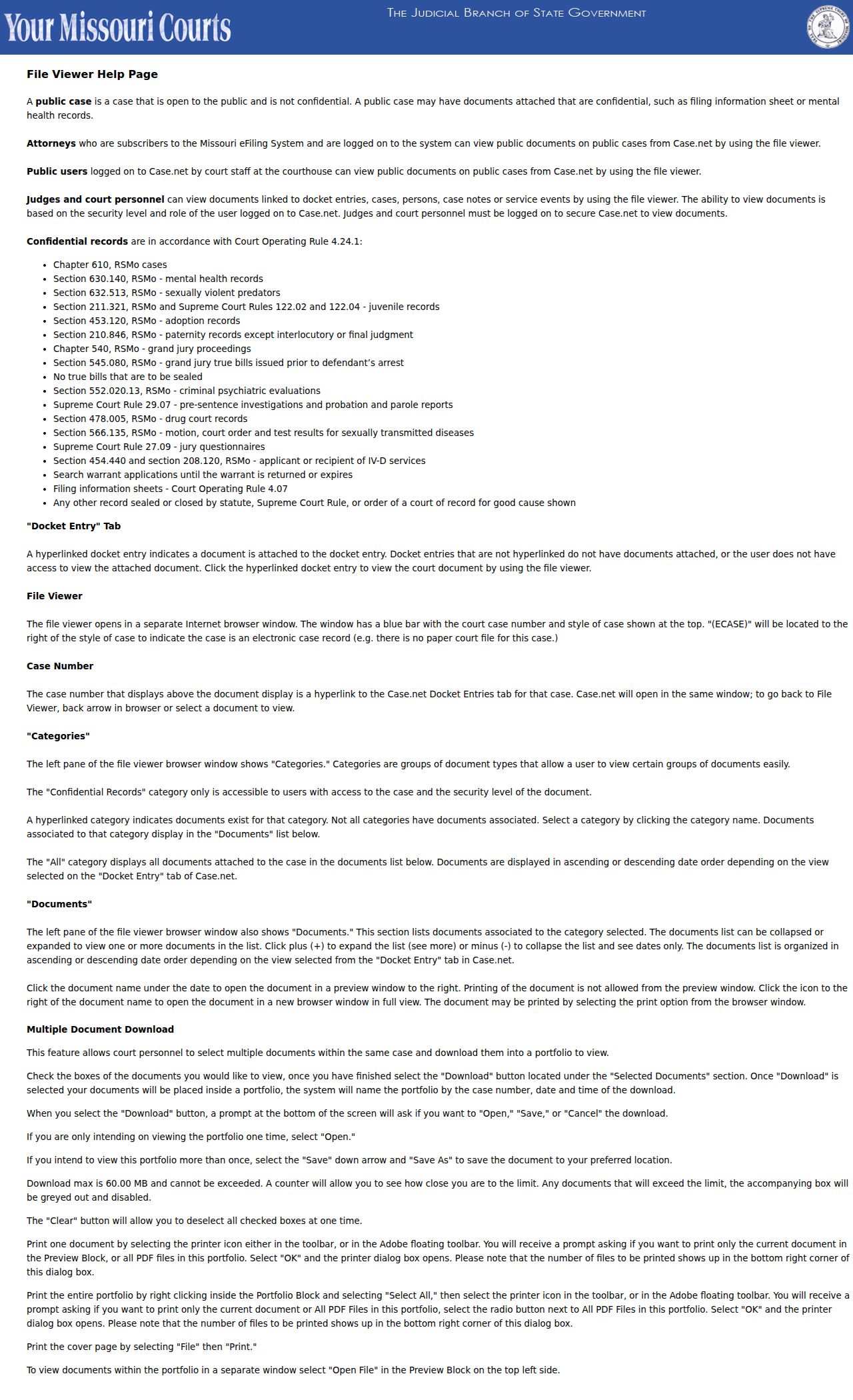
When an image or download falls short, go to the source. Ask the Mississippi County Circuit Clerk for the right copy type or a certification.
Statewide vs County Case Search
Case.net is the statewide public tool. The Mississippi County Circuit Clerk is the local court-record contact. Each does what the other cannot. Use the portal to identify a public case, review docket entries, and check scheduled hearings. Turn to the clerk for a counter search, a public terminal, copy requests, or restricted-record procedure. The clerk can also help with a legacy or incomplete result. One caution: the County Clerk is a separate county-government officer. Do not treat that office as the judicial case custodian for Mississippi County court records.
| Channel | Best use | Limit |
|---|---|---|
| Missouri Case.net | Public name, case number, filing-date, and hearing searches; visible docket entries | Not the complete official record and does not expose every document. |
| Mississippi County Circuit Clerk | Local record routing, public-terminal access, copy requests, and case clarification | Access remains subject to court rules and confidentiality limits. |
| Missouri eFiling | Authorized electronic filing and registered-user functions | Not the general public search interface. |
Mississippi County Case Search at Court
When Case.net shows no public document for an older filing, the Mississippi County courthouse public terminal is the fallback. The Circuit Clerk's office sits at 200 N Main St., 2nd Floor, Charleston, Missouri 63834. Bring the case number if you have it. Without one, give full party names, an approximate filing year, division, case type, and the likely court location. Be clear about what you want, too. Viewing a docket is not the same as obtaining copies of the full file.
Mississippi County Circuit Clerk
200 N Main St., 2nd Floor
Charleston, MO 63834
(573) 683-2161
Monday through Friday, 8:00 a.m. to 4:30 p.m.
Mail: PO Box 369, Charleston, MO 63834
For this local record route, hours, and contact information, check the official Circuit Clerk page. Call ahead for a large inspection or a request that may need advance retrieval.
Access and Restricted Cases
A Mississippi County case search does not make every court record public. Missouri Court Operating Rule 4 and other laws can restrict filing-information sheets, protected addresses and identifiers, mental-health material, jury questionnaires, sealed files, expunged matters, and other protected records. Juvenile, adoption, paternity, child-support, and financial materials often carry extra limits. A visible case header is no promise that every attachment is open for inspection.
For a confidential or sealed record, start with the county-linked GN318 application. Contact the Circuit Clerk for current submission instructions. The form asks for case and applicant information, the records sought, a reason for access, and whether documents are redacted or unredacted. Filing it requests court review, not a guarantee of access.
Note: If access is denied, ask whether a redacted public version exists. Request the legal basis for the restriction when appropriate.
Mississippi County Case Search and eFiling
Mississippi County has required electronic filing for all cases since June 3, 2013. That date comes from the county Circuit Clerk page. The mandate does not make the Missouri eFiling System a public search tool. eFiling handles electronic filing and registered-user document functions. Its registration and login process serves people with filing roles and access rights. Ordinary public case lookup still begins with Case.net.
The Missouri eFiling and public-access information draws the line between registered access and courthouse-terminal public access. Sometimes public material will not come through a normal remote result. Then the courthouse terminal remains the Mississippi County case search fallback.
Mississippi County Case Search Alerts
Case.net's Track This Case feature can send an email alert. Setup takes an email address, a confirmation email, a verification code, and case information. The official Track This Case instructions describe the public search methods and the email-alert confirmation path. It is a convenience for following an eligible public case, not an official record. Secure cases may not be trackable through the public tool. Matters routed to the Fine Collection Center may not be trackable either. Keep the confirmation email, then check the docket directly for important actions or court settings.
The alert workflow can help you monitor an eligible Mississippi County case. Still, the current docket entry remains the record to confirm. The Missouri eFiling login is separate from the public-alert process. It does not replace a Mississippi County Case.net lookup. That distinct login screen exists for a reason: filing access and public case searching are different functions.